Authentication
In order to access this API, the user agent needs to send your API key in the Authorization header using Bearer schema. Every successful request uses credits from your account (see Cost on each endpoint); requests that fail are not charged.
Go to your API Keys dashboard to create and manage your keys.
Manage API Keys →Try it for free. The first 50 API calls are on us — no credit card required. Contact us to get access to the free credits.
Contact us →Authorization: Bearer <your api token>
const headers = new Headers();
headers.append("Authorization", "Bearer YOUR_API_KEY_HERE");

const formdata = new FormData();

const requestOptions = {
  method: ...,
  body: ...,
  headers: headers,
};

fetch(url, requestOptions)
Image Upscaler
The image upscale feature provides a better image to the user by increasing its resolution.
Method: POST
Endpoint: https://api.yumepik.com/api/v2.0/ai-tools/image-upscaler
Authorization: Bearer <your api token>
Cost
Charged only when the request succeeds.
Request Bodymultipart/form-data
file - File
Required
The reference image to upscale.
Supported file formats: PNG, JPG, WEBP, PDF.
Demo:

face_enhance - boolean
Whether or not to enhance the face(s) of the image.
Default value: true
upscale_size - integer
The image upscaling size.
Range: 2-10
Default value: 2
ai_model - string
Used to determine which AI model to use when upscaling an image.
Default value: standard
Enum values
standard
Best choice for upscaling various types of images, including those with people, objects, and a wide range of other subjects.
pro
Ideal for detailed photography. Preserves more details compared to the standard model, though it requires additional processing time.
creative
Perfect for adding artistic details to your image. This model introduces creative elements, diverging from the original image.
studio
Best for professional photography and high-resolution images. It offers superior detail preservation and quality, but takes longer to process.
const url = "https://api.yumepik.com/api/v2.0/ai-tools/image-upscaler"

const headers = new Headers();
headers.append("Authorization", "Bearer YOUR_API_KEY_HERE");

const formdata = new FormData();

formdata.append("file", "image.png");
formdata.append("face_enhance", true);
formdata.append("upscale_size", 2);

const requestOptions = {
  method: 'POST',
  body: formdata,
  headers: headers,
};

fetch(url, requestOptions)
  .then(response => response.json())
  .then(result => console.log(result))
  .catch(error => console.log("error", error));
{
    "image_url": "...",
    "operation_id": "..."
}

Image Vectorizer
The image vectorizer endpoint is used to convert a raster image into a vector file.
Method: POST
Endpoint: https://api.yumepik.com/api/v2.0/ai-tools/image-vectorizer
Authorization: Bearer <your api token>
Cost
Charged only when the request succeeds.
Request Bodymultipart/form-data
file - File
The reference image to vectorize. Required if file_url is not provided.
Supported file formats: PNG, JPG, WEBP, AVIF, PDF, SVG.
Demo:
file_url - string
URL to the file to vectorize. Must be publicly accessible. Can be used interchangeably with the 'file' field; if both are provided, 'file' takes precedence.
format - string
The file format in which to vectorize the image.
Default value: svg
Enum values
svg
Use to receive a vector file in SVG format.
eps
Use to receive a vector file in EPS format
const url = "https://api.yumepik.com/api/v2.0/ai-tools/image-vectorizer"

const headers = new Headers();
headers.append("Authorization", "Bearer YOUR_API_KEY_HERE");

const formdata = new FormData();

formdata.append("file", "image.png");
formdata.append("format", 'svg');

const requestOptions = {
  method: 'POST',
  body: formdata,
  headers: headers,
};

fetch(url, requestOptions)
  .then(response => response.json())
  .then(result => console.log(result))
  .catch(error => console.log("error", error));
{
    "image_url": "...",
    "operation_id": "..."
}
Background Remover
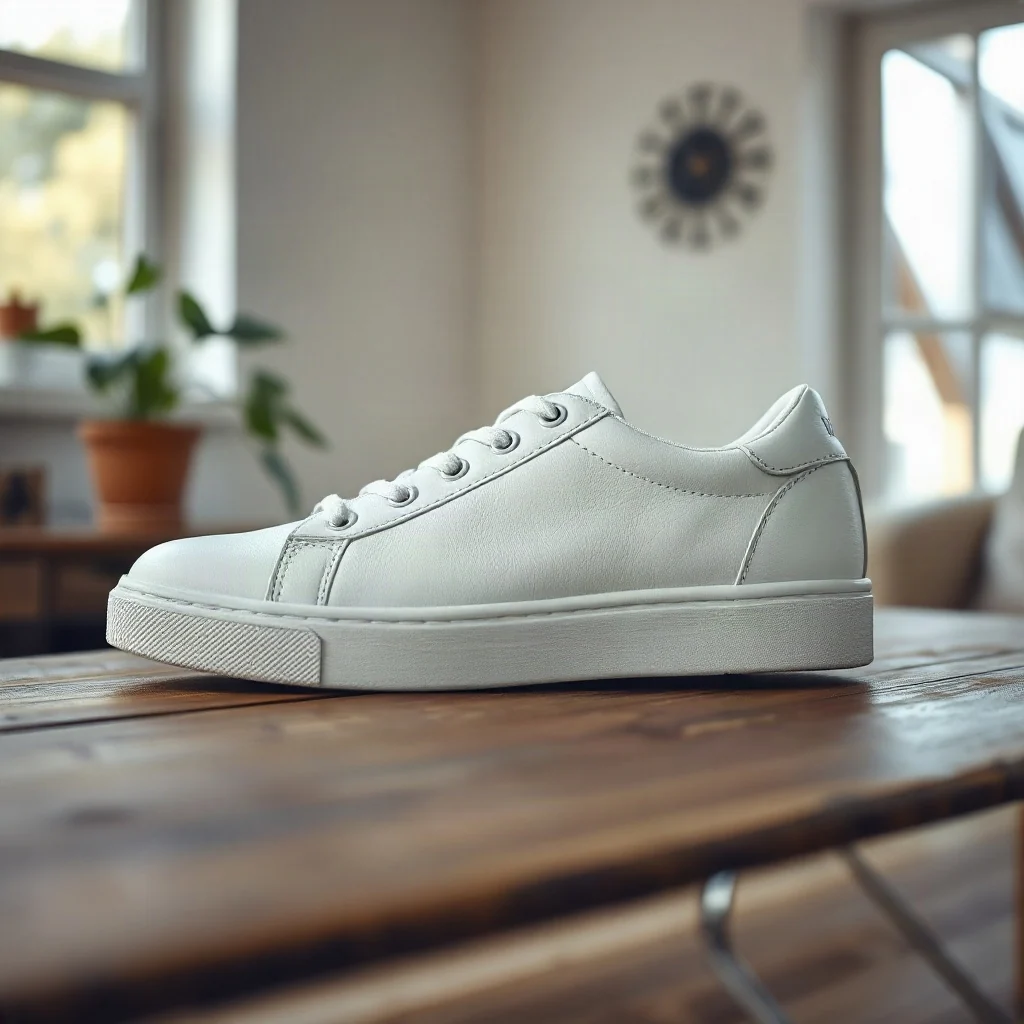
The image background removal tool is used to automatically remove the background from an image.
Method: POST
Endpoint: https://api.yumepik.com/api/v2.0/ai-tools/background-remover
Authorization: Bearer <your api token>
Cost
Charged only when the request succeeds.
Request Bodymultipart/form-data
file - File
Required
The reference image to remove the background from.
Supported file formats: PNG, JPG, WEBP, PDF
Demo:
const url = "https://api.yumepik.com/api/v2.0/ai-tools/background-remover"

const headers = new Headers();
headers.append("Authorization", "Bearer YOUR_API_KEY_HERE");

const formdata = new FormData();

formdata.append("file", "image.png");

const requestOptions = {
  method: 'POST',
  body: formdata,
  headers: headers,
};

fetch(url, requestOptions)
  .then(response => response.json())
  .then(result => console.log(result))
  .catch(error => console.log("error", error));
{
    "image_url": "...",
    "operation_id": "..."
}
Method: POST
Endpoint: https://api.yumepik.com/api/v2.0/ai-tools/image-generator
Authorization: Bearer <your api token>
Cost
Charged only when the request succeeds.
Request Bodyapplication/json
prompt - string
Required
The prompt parameter is the text that directs the AI to create an image based on your description. It captures the concept or scene you want the AI to visualize. A well-crafted prompt, like "A peaceful forest at night with a glowing moon," helps ensure accurate results.
negative_prompt - string
The negative_prompt parameter allows you to guide the AI by indicating what you don't want in the image, refining the result to better match your vision.
number_of_results - string
Describes the number of images the API will generate and return.
Range: 1-4
Default value: 1
aspect_ratio - string
Describes the aspect ratio which will be applied on the generated image(s).
Default value: 1:1
Enum values
1:1
Perfectly square, providing a harmonious and proportional layout.
9:16
Ideal for vertical content, designed to captivate and enhance visual storytelling.
16:9
Widescreen format, ideal for capturing larger landscapes.
4:3
Elegant horizontal format, portrait orientation.
3:4
Portrait-oriented, gracefully accentuating vertical features.
3:2
A classic proportion that offers a broader perspective.
const url = "https://api.yumepik.com/api/v2.0/ai-tools/image-generator"

const headers = new Headers();
headers.append("Authorization", "Bearer YOUR_API_KEY_HERE");
headers.append("Content-Type", "application/json");


const requestOptions = {
  method: 'POST',
  body: JSON.stringify({
    "prompt": "A futuristic city at night, neon skyscrapers reflected in the water.",
    "negative_prompt": "People, text",
    "number_of_results": 1,
    "aspect_ratio": "1:1"
  }),
  headers: headers,
};

fetch(url, requestOptions)
  .then(response => response.json())
  .then(result => console.log(result))
  .catch(error => console.log("error", error));
{
    "image_url": "...",
    "operation_id": "..."
}

Image Colorizer
The image colorizer endpoint is used to colorize a black-and-white image.
Method: POST
Endpoint: https://api.yumepik.com/api/v2.0/ai-tools/image-colorizer
Authorization: Bearer <your api token>
Cost
Charged only when the request succeeds.
Request Bodymultipart/form-data
file - File
Required
The original image to colorize.
Supported file formats: PNG, JPG, WEBP
Demo:

const url = "https://api.yumepik.com/api/v2.0/ai-tools/image-colorizer"

const headers = new Headers();
headers.append("Authorization", "Bearer YOUR_API_KEY_HERE");

const formdata = new FormData();

formdata.append("file", "image.png");

const requestOptions = {
  method: 'POST',
  body: formdata,
  headers: headers,
};

fetch(url, requestOptions)
  .then(response => response.json())
  .then(result => console.log(result))
  .catch(error => console.log("error", error));
{
    "image_url": "...",
    "operation_id": "..."
}

Image Inpaint
The image inpaint endpoint is used to removed unwanted parts from an image.
Method: POST
Endpoint: https://api.yumepik.com/api/v2.0/ai-tools/image-inpaint
Authorization: Bearer <your api token>
Cost
Charged only when the request succeeds.
Request Bodymultipart/form-data
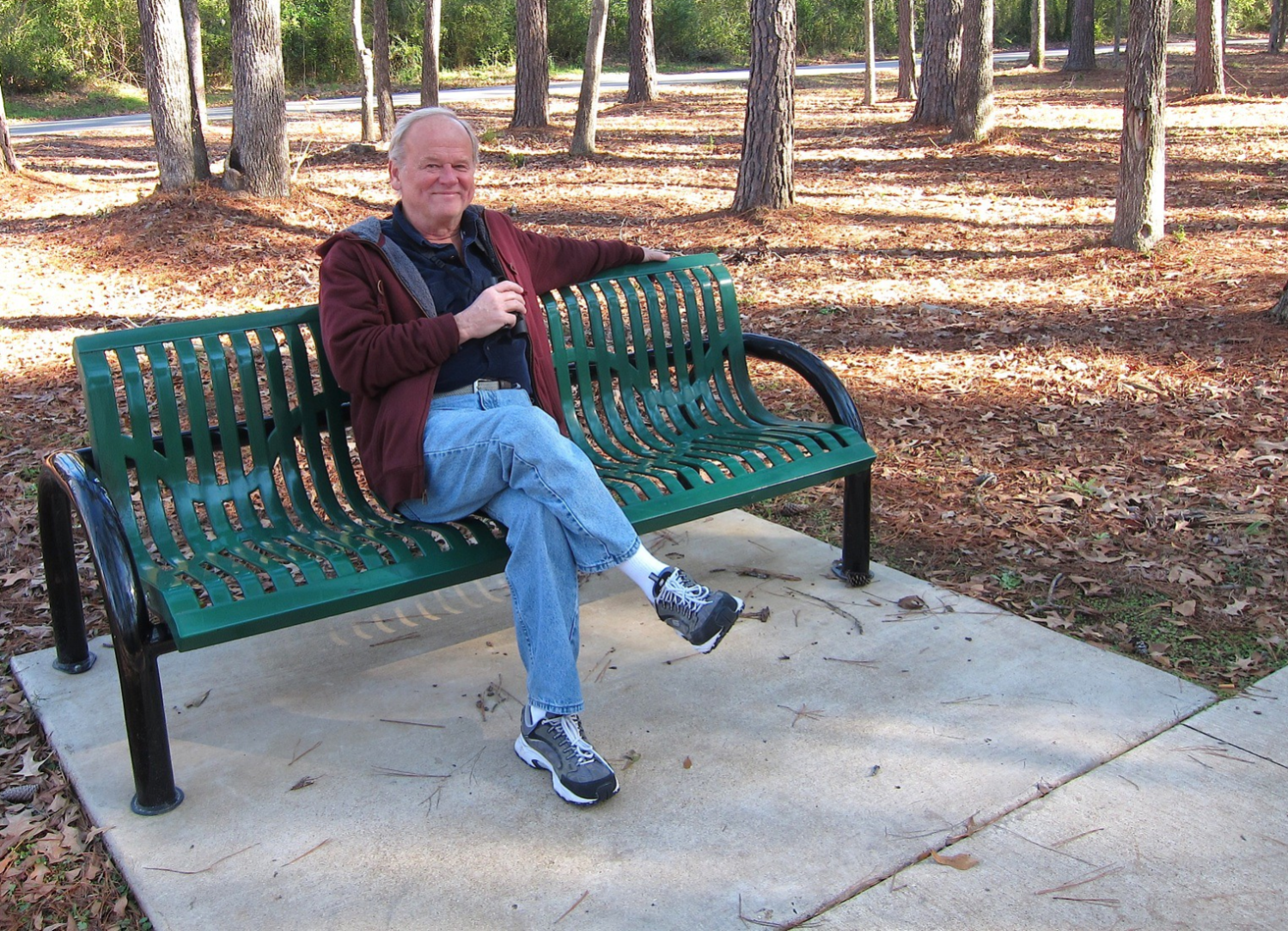
image - File
Required
The original image to inpaint.
Supported file formats: PNG, JPG, WEBP
Demo:
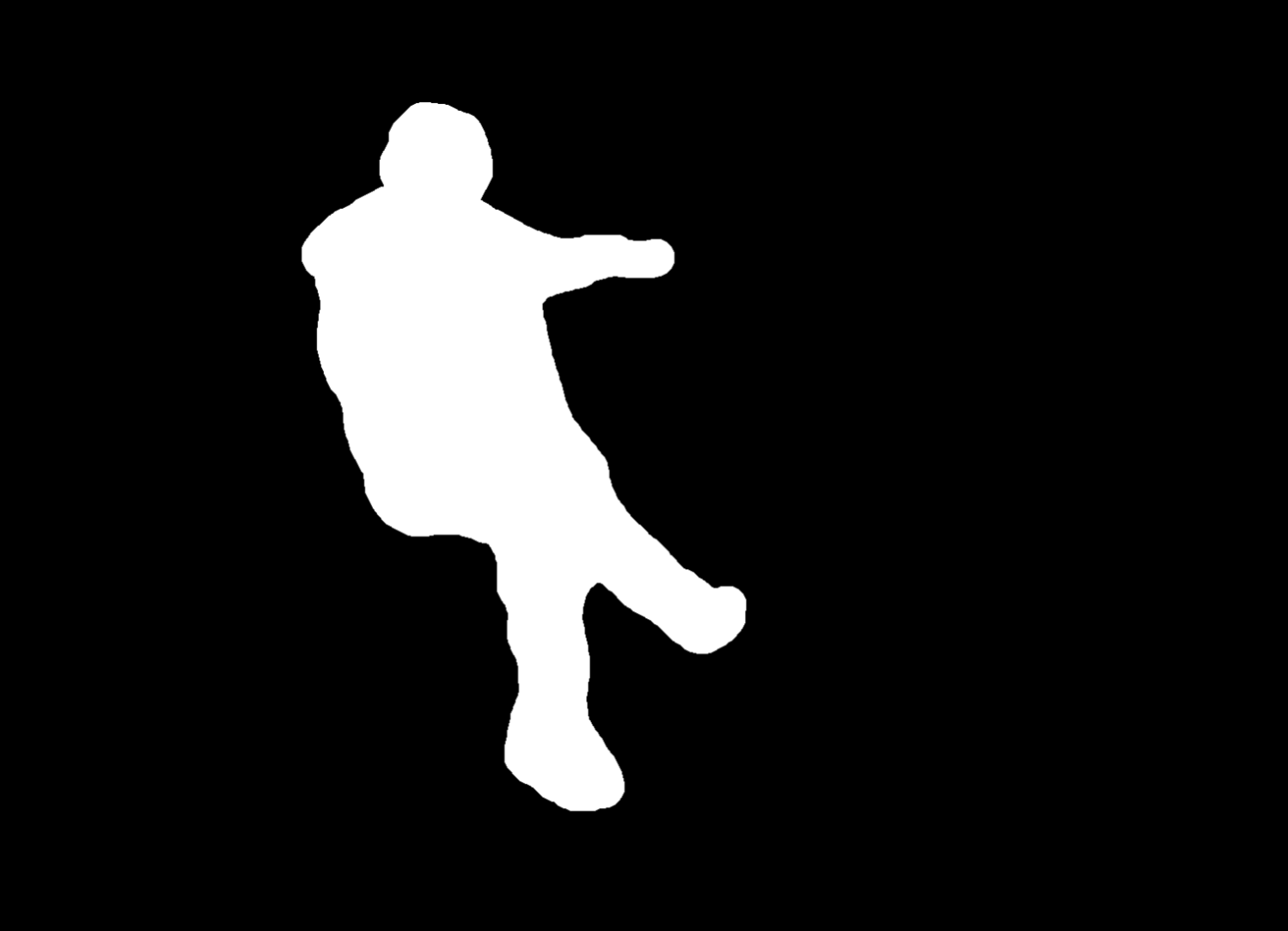
mask - File
Required
An image containing the negative mask of the unwanted parts to delete.
Supported file formats: PNG, JPG, WEBP
Demo:
const url = "https://api.yumepik.com/api/v2.0/ai-tools/image-inpaint"

const headers = new Headers();
headers.append("Authorization", "Bearer YOUR_API_KEY_HERE");

const formdata = new FormData();

formdata.append("image", "image.png");
formdata.append("mask", "mask.png");

const requestOptions = {
  method: 'POST',
  body: formdata,
  headers: headers,
};

fetch(url, requestOptions)
  .then(response => response.json())
  .then(result => console.log(result))
  .catch(error => console.log("error", error));
{
    "image_url": "...",
    "operation_id": "..."
}
AI Image Edit
The AI image edit endpoint edits one or more images from a plain-language prompt: stage an empty room, turn a day shot into twilight, place a product in a new scene, remove or replace objects. If the chosen model fails, the request falls back to the other models automatically.
Method: POST
Endpoint: https://api.yumepik.com/api/v3/prompt-image-edit
Authorization: Bearer <your api token>
Cost
Charged only when the request succeeds.
Request Bodyapplication/json
files - array
Required
URLs of the images to edit. Must be publicly accessible. Pass several to combine them, for example a product photo and a reference scene.
Supported file formats: PNG, JPG, WEBP
Demo:

prompt - string
Required
What to change, in plain language. Say what must stay the same too (for example "Keep walls, windows and floor unchanged").
ai_model - string
Required
The model tried first. If it fails, the others are tried in turn.
Enum values
gemini_3
Gemini 3 Pro (Nano Banana Pro).
gemini_2.5
Gemini 2.5 (Nano Banana).
qwen
Qwen image edit.
pruna
The fastest model.
flux
Flux.
negative_prompt - string
Words or concepts to keep out of the result.
const url = "https://api.yumepik.com/api/v3/prompt-image-edit"

const headers = new Headers();
headers.append("Authorization", "Bearer YOUR_API_KEY_HERE");
headers.append("Content-Type", "application/json");

const requestOptions = {
  method: 'POST',
  body: JSON.stringify({
    "files": ["https://example.com/empty-room.jpg"],
    "prompt": "Stage this empty room as a bright Scandinavian living room. Keep walls, windows and floor unchanged.",
    "ai_model": "gemini_3"
  }),
  headers: headers,
};

fetch(url, requestOptions)
  .then(response => response.json())
  .then(result => console.log(result))
  .catch(error => console.log("error", error));
{
    "image_url": "...",
    "operation_id": "..."
}

Object Detection
Analyse the content of an image and detect all objects present in it. For each detected object the API returns a confidence score, a label describing the object, and a segmentation mask encoded as a base64 PNG string.
Method: POST
Endpoint: https://api.yumepik.com/api/v2.0/ai-tools/object-detection
Authorization: Bearer <your api token>
Cost
Request Bodymultipart/form-data
image - File
Required
The image to analyse. The API will detect all objects present in it and return a label, a confidence score, and a segmentation mask for each one.
Supported file formats: PNG, JPG, WEBP, TIFF, AIFF
Demo:

const url = "https://api.yumepik.com/api/v2.0/ai-tools/object-detection"

const headers = new Headers();
headers.append("Authorization", "Bearer YOUR_API_KEY_HERE");

const formdata = new FormData();
formdata.append("image", imageFile); // File object or Blob

const requestOptions = {
  method: 'POST',
  body: formdata,
  headers: headers,
};

fetch(url, requestOptions)
  .then(response => response.json())
  .then(result => console.log(result))
  .catch(error => console.log("error", error));
"objects": [
  {
    "score": 0.998652,
    "label": "handbag",
    "mask": "<base64-encoded PNG mask>"
  },
  {
    "score": 0.927888,
    "label": "window-other",
    "mask": "<base64-encoded PNG mask>"
  },
  {
    "score": 0.999516,
    "label": "person",
    "mask": "<base64-encoded PNG mask>"
  },
  ...
],
"operation_id": "..."
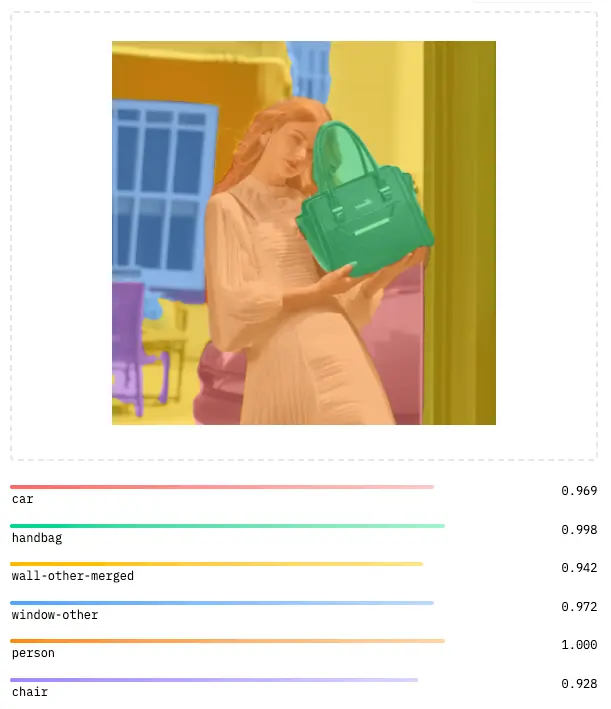
Image Outpaint
The image outpaint endpoint is used to extend an image beyond its original boundaries using AI-powered generation.
Method: POST
Endpoint: https://api.yumepik.com/api/v3/image-outpaint
Authorization: Bearer <your api token>
Cost
Charged only when the request succeeds.
Request Bodymultipart/form-data
image - File
Required
The original image to extend. The output image dimensions are set by width and height, and the original image is placed within it at reference_offset_x and reference_offset_y.
Supported file formats: PNG, JPG, WEBP
Demo:

width - integer
Required
The width, in pixels, of the resulting outpainted image.
height - integer
Required
The height, in pixels, of the resulting outpainted image.
reference_offset_x - integer
Required
The horizontal offset, in pixels, at which the original image is placed within the resulting canvas. Reference the top left corner of the original image as (0, 0).
reference_offset_y - integer
Required
The vertical offset, in pixels, at which the original image is placed within the resulting canvas. Reference the top left corner of the original image as (0, 0).
const url = "https://api.yumepik.com/api/v3/image-outpaint"

const headers = new Headers();
headers.append("Authorization", "Bearer YOUR_API_KEY_HERE");

const formdata = new FormData();

formdata.append("image", "image.png");
formdata.append("width", "1920");
formdata.append("height", "1080");
formdata.append("reference_offset_x", "414");
formdata.append("reference_offset_y", "0");

const requestOptions = {
  method: 'POST',
  body: formdata,
  headers: headers,
};

fetch(url, requestOptions)
  .then(response => response.json())
  .then(result => console.log(result))
  .catch(error => console.log("error", error));
{
    "image_url": "...",
    "operation_id": "..."
}

DPI Converter
The DPI converter tool allows you to change the DPI (dots per inch) resolution of an image. This is useful for preparing images for print or adjusting resolution metadata without changing the actual pixel dimensions.
Method: POST
Endpoint: https://api.yumepik.com/api/v2.0/tools/dpi-converter
Authorization: Bearer <your api token>
Cost
Charged only when the request succeeds.
Request Bodymultipart/form-data
file - File
Required
The image file to convert to a new DPI resolution.
Supported file formats: PNG, JPG, WEBP.
new_dpi - integer
Required
The target DPI (dots per inch) value for the output image. Common values are 72 for web, 150 for draft print, and 300 for high-quality print.
const url = "https://api.yumepik.com/api/v2.0/tools/dpi-converter"

const headers = new Headers();
headers.append("Authorization", "Bearer YOUR_API_KEY_HERE");

const formdata = new FormData();

formdata.append("file", "image.png");
formdata.append("new_dpi", "300");

const requestOptions = {
  method: 'POST',
  body: formdata,
  headers: headers,
};

fetch(url, requestOptions)
  .then(response => response.json())
  .then(result => console.log(result))
  .catch(error => console.log("error", error));
{
    "image_url": "...",
    "operation_id": "..."
}
File Converter
The file converter tool allows you to convert images between different file formats. Convert your images to PNG, JPG, WEBP, AVIF, PDF, and more.
Method: POST
Endpoint: https://api.yumepik.com/api/v2.0/tools/file-converter
Authorization: Bearer <your api token>
Cost
Charged only when the request succeeds.
Request Bodymultipart/form-data
file - File
Required
The image file to convert to a different format.
Supported file formats: PNG, JPG, WEBP, AVIF, PDF, SVG.
output_format - string
Required
The target file format for the converted image.
Enum values
png
Convert to PNG format. Best for images with transparency or sharp edges.
jpg
Convert to JPG format. Best for photographs and images without transparency.
webp
Convert to WebP format. Modern format with excellent compression and quality.
avif
Convert to AVIF format. Next-gen format with superior compression.
Convert to PDF format. Ideal for documents and print-ready files.
const url = "https://api.yumepik.com/api/v2.0/tools/file-converter"

const headers = new Headers();
headers.append("Authorization", "Bearer YOUR_API_KEY_HERE");

const formdata = new FormData();

formdata.append("file", "image.png");
formdata.append("output_format", "webp");

const requestOptions = {
  method: 'POST',
  body: formdata,
  headers: headers,
};

fetch(url, requestOptions)
  .then(response => response.blob())
  .then(blob => {
    // Handle the converted file blob
    console.log("Converted file:", blob);
  })
  .catch(error => console.log("error", error));
Binary file data (the converted image file)

Note: The response is returned as binary data (ArrayBuffer/Blob),
not JSON. Save the response directly as a file with the appropriate extension.
Color Profile Converter
The color profile converter tool allows you to convert images between different ICC color profiles (e.g., sRGB, Adobe RGB, CMYK profiles). This is essential for ensuring color accuracy across different devices and for preparing images for professional print workflows.
Method: POST
Endpoint: https://api.yumepik.com/api/v3/color-profile-editor
Authorization: Bearer <your api token>
Cost
Charged only when the request succeeds.
Request Bodymultipart/form-data
image - File
Required
The image file to convert to a new color profile.
Supported file formats: PNG, JPG, WEBP, TIFF.
target_profile - string
Required
The ICC color profile to convert the image to. Supports both RGB and CMYK profiles.
Enum values
sRGB
Standard RGB color space, widely used for web and digital displays.
AdobeRGB1998
Adobe RGB (1998) color space, offering a wider gamut than sRGB. Ideal for professional photography.
ProPhotoRGB
ProPhoto RGB color space with an extremely wide gamut, suitable for high-end photo editing.
DisplayP3
Display P3 color space, used by modern Apple devices and HDR displays.
AppleRGB
Apple RGB color space, a legacy profile used by older Apple displays.
ColorMatchRGB
ColorMatch RGB, designed for prepress workflows with Radius PressView displays.
USWebCoatedSWOP
U.S. Web Coated (SWOP) v2 — standard CMYK profile for US web offset printing.
USWebUncoated
U.S. Web Uncoated — CMYK profile for US uncoated paper printing.
CoatedFOGRA39
ISO Coated v2 (FOGRA39) — European standard CMYK profile for coated paper.
CoatedFOGRA27
Coated FOGRA27 — CMYK profile for coated paper (older ISO standard).
FOGRA51
FOGRA51 (PSO Coated v3) — modern European CMYK profile for coated paper.
JapanColor2001Coated
Japan Color 2001 Coated — standard CMYK profile for Japanese coated paper printing.
output_format - string
The MIME type of the output image. Determines the file format of the converted result.
Default value: image/tiff
Enum values
image/tiff
TIFF format — lossless, ideal for print workflows and preserving color profile accuracy.
image/png
PNG format — lossless compression, widely supported for digital use.
image/jpeg
JPEG format — lossy compression, best for photographs and smaller file sizes.
const url = "https://api.yumepik.com/api/v3/color-profile-editor"

const headers = new Headers();
headers.append("Authorization", "Bearer YOUR_API_KEY_HERE");

const formdata = new FormData();

formdata.append("image", "image.png");
formdata.append("target_profile", "USWebCoatedSWOP");
formdata.append("output_format", "image/tiff");

const requestOptions = {
  method: 'POST',
  body: formdata,
  headers: headers,
};

fetch(url, requestOptions)
  .then(response => response.json())
  .then(result => console.log(result))
  .catch(error => console.log("error", error));
{
    "ok": true,
    "source_profile": "sRGB",
    "target_profile": "USWebCoatedSWOP",
    "converted_image_base64": "base64_encoded_image_data...",
    "mime_type": "image/tiff",
    "operation_id": "..."
}
NSFW Check
The NSFW check endpoint is used to check if an image is Not Safe For Work (NSFW).
Method: POST
Endpoint: https://api.yumepik.com/api/v2.0/ai-tools/nsfw-check
Authorization: Bearer <your api token>
Cost
Charged only when the request succeeds.
Request Bodymultipart/form-data
file - File
Required
The image to check for NSFW content.
Supported file formats: PNG, JPG, WEBP
const url = "https://api.yumepik.com/api/v2.0/ai-tools/nsfw-check"

const headers = new Headers();
headers.append("Authorization", "Bearer YOUR_API_KEY_HERE");

const formdata = new FormData();

formdata.append("file", "image.png");

const requestOptions = {
  method: 'POST',
  body: formdata,
  headers: headers,
};

fetch(url, requestOptions)
  .then(response => response.json())
  .then(result => console.log(result))
  .catch(error => console.log("error", error));
{
  "is_nsfw": true,
  "confidence": 0.9,
  "safe_score": 0.1
}
Image Relight
The image relight endpoint analyzes the content of an image and returns an intelligently relighted version with enhanced lighting and shadows.
Method: POST
Endpoint: https://api.yumepik.com/api/v3/relight
Authorization: Bearer <your api token>
Cost
Charged only when the request succeeds.
Request Bodymultipart/form-data
file - File
Required
The image to relight with intelligent lighting analysis.
Supported file formats: PNG, JPG, WEBP
const url = "https://api.yumepik.com/api/v3/relight"

const headers = new Headers();
headers.append("Authorization", "Bearer YOUR_API_KEY_HERE");

const formdata = new FormData();

formdata.append("file", "image.png");

const requestOptions = {
  method: 'POST',
  body: formdata,
  headers: headers,
};

fetch(url, requestOptions)
  .then(response => response.json())
  .then(result => console.log(result))
  .catch(error => console.log("error", error));
{
    "image_url": "...",
    "operation_id": "..."
}
Clothes Extractor
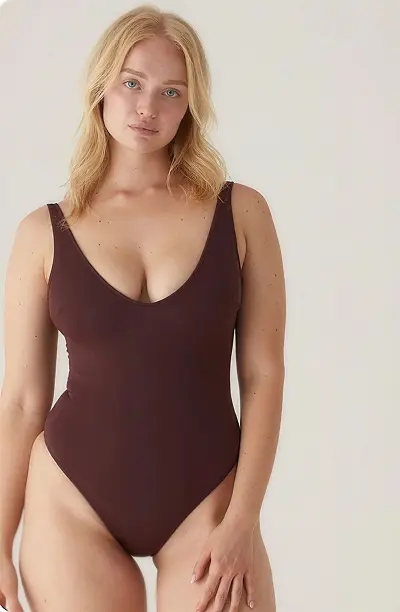
The clothes extractor endpoint uses AI-powered segmentation to detect and isolate clothing items from any photo, returning a PNG with a transparent background.
Method: POST
Endpoint: https://api.yumepik.com/api/v3/extract-clothes
Authorization: Bearer <your api token>
Cost
Charged only when the request succeeds.
Request Bodymultipart/form-data
file - File
Required
The input image from which clothing items will be extracted. The response will be a PNG with a transparent background containing only the detected garments.
Supported file formats: PNG, JPG, WEBP
Demo:
const url = "https://api.yumepik.com/api/v3/extract-clothes"

const headers = new Headers();
headers.append("Authorization", "Bearer YOUR_API_KEY_HERE");

const formdata = new FormData();

formdata.append("file", "image.png");

const requestOptions = {
  method: 'POST',
  body: formdata,
  headers: headers,
};

fetch(url, requestOptions)
  .then(response => response.json())
  .then(result => console.log(result))
  .catch(error => console.log("error", error));
{
    "image_url": "...",
    "operation_id": "..."
}
Add Bleed & Crop Marks
Turns a PDF, PNG or JPG into a print-ready PDF: adds bleed on every side (mirrored, stretched or AI-extended artwork), crop and registration marks, and sets the TrimBox and BleedBox printers check. Every option is a plain form field. Optionally resizes the artwork to a standard print size. Use mode "preview" to check the result for free: each page comes back as one full-quality image with a PREVIEW watermark built into it (mirror and stretch fill only). AI fill extends each page with the Outpainting model (at most 10 pages per file) and each page is also charged as one Outpainting request. result_url is the PDF's public URL (https://storage.googleapis.com/creative-ais/<id>.pdf); the file is kept for 30 days. Failed requests return { "error": "<code>" }, for example unsupported_file, too_large, encrypted, unreadable, too_many_pages, ai_too_many_pages or invalid_parameter (with the parameter's name in parameter).
Method: POST
Endpoint: https://api.yumepik.com/api/v3/add-bleed
Authorization: Bearer <your api token>
Cost
Charged only when the request succeeds.
Request Bodymultipart/form-data
file - File
Required
The artwork to prepare for print. PDFs keep their vectors and text; PNG and JPG are placed at 300 ppi. Up to 100 MB and 200 pages. Send the file itself, or a public https URL to it as text. ⚠️ Files sent directly are limited to 4.5 MB (a hosting limit): for bigger files, send a URL instead, up to 100 MB. Redirects are followed; a URL that can't be fetched returns download_failed.
Supported file formats: PDF, PNG, JPG
size - string
Finished size of the print. "original" keeps the size of your file.
Default value: original
Enum values
original
The file's own size.
business_card_eu
85 × 55 mm
business_card_us
3.5 × 2 in
a4
210 × 297 mm
a5
148 × 210 mm
a6
105 × 148 mm
letter
8.5 × 11 in
postcard
6 × 4 in
orientation - string
Orientation of a preset size.
Default value: portrait
Enum values
portrait
Taller than wide.
landscape
Wider than tall.
bleed - string
Bleed added on every side.
Default value: 3mm
Enum values
3mm
3 mm
5mm
5 mm
eighth_in
1/8 in (3.175 mm)
custom
custom_bleed in bleed_unit.
custom_bleed - string
Custom bleed, up to 20 mm. Used when bleed is "custom".
Default value: 3
bleed_unit - string
Unit of custom_bleed.
Default value: mm
Enum values
mm
Millimetres.
in
Inches.
fill - string
How the bleed is filled.
Default value: mirror
Enum values
mirror
Mirrors the artwork at each edge.
stretch
Stretches the outermost pixels.
ai
Extends the artwork with AI; each page is also charged as one Outpainting request (up to 10 pages). Not available with mode "preview".
crop_marks - boolean
Adds crop marks at the corners.
Default value: true
Enum values
true
With crop marks.
false
Without.
registration_marks - boolean
Adds registration marks on each side.
Default value: false
Enum values
true
With registration marks.
false
Without.
mode - string
Whether you get the print-ready PDF or a free preview of it. preview can't be combined with fill "ai".
Default value: final
Enum values
final
The print-ready PDF, without a watermark.
preview
Free. Each page as one full-quality image (at least 300 dpi, or your image's own resolution) with a PREVIEW watermark across it, at the same size and with the same TrimBox and BleedBox, so you can check the result. The watermark is part of the image and can't be removed.
file_name - string
Name used for the PDF's title and the downloaded file. Defaults to the uploaded file's name.
const url = "https://api.yumepik.com/api/v3/add-bleed";

const headers = new Headers();
headers.append("Authorization", "Bearer YOUR_API_KEY_HERE");

const formdata = new FormData();
formdata.append("file", "flyer.pdf");
formdata.append("bleed", "3mm");
formdata.append("fill", "mirror");
formdata.append("crop_marks", "true");

fetch(url, { method: "POST", body: formdata, headers })
  .then((response) => response.json())
  .then((result) => console.log(result))
  .catch((error) => console.log("error", error));
{
    "result_url": "https://storage.googleapis.com/creative-ais/uvFnKOH4LiU3ZH3l2ZVDC.pdf",
    "file_name": "flyer-print-ready.pdf",
    "pages": 2,
    "operation_id": "req_..."
}
Image to Embroidery (DST, PES, JEF, EXP)
Digitizes an image into a machine embroidery design: picks the thread colors from the artwork, leaves out a plain background, and covers every shape with stitches (satin columns for narrow shapes like text and outlines, tatami fill for larger areas, with underlay, pull compensation, lock stitches and trims). Logos and flat artwork give the best results; photos are reduced to a few flat colors. The design is centered on the hoop. Every option is a plain form field. preview_url is a PNG of the stitches on a transparent background and design describes the result (size, stitch count, thread colors in sewing order with their stitch counts, trims and sewing time). Use mode "preview" to check the result for free; mode "final" also returns files, the DST (Tajima), PES (Brother), JEF (Janome) and EXP (Melco) files. The same image and settings always give the same stitches. Files are public URLs (https://storage.googleapis.com/creative-ais/<id>.dst) kept for 30 days. Failed requests return { "error": "<code>" }, for example unsupported_file, too_large, unreadable, empty (no design found), too_complex or invalid_parameter (with the parameter's name in parameter).
Method: POST
Endpoint: https://api.yumepik.com/api/v3/image-to-embroidery
Authorization: Bearer <your api token>
Cost
Charged only when the request succeeds.
Request Bodymultipart/form-data
file - File
Required
The image to digitize: a logo or flat artwork works best. Transparent areas are never stitched. Up to 100 MB. Send the file itself, or a public https URL to it as text. ⚠️ Files sent directly are limited to 4.5 MB (a hosting limit): for bigger files, send a URL instead, up to 100 MB. Redirects are followed; a URL that can't be fetched returns download_failed.
Supported file formats: PNG, JPG, TIFF
width_mm - integer
Finished width of the design in mm, from 20 to 400. The height follows the image; a design taller than 400 mm is scaled down to fit.
Default value: 100
colors - string
Number of thread colors: auto, or a number from 1 to 12.
Default value: auto
Enum values
auto
As many as the image needs, up to 12. Near-identical shades are merged.
1–12
Exactly this many colors (fewer if the image has fewer).
density - string
Distance between the rows of fill stitches.
Default value: standard
Enum values
light
0.5 mm rows, for thin fabrics.
standard
0.42 mm rows, for most garments.
dense
0.36 mm rows, for caps and thick fabrics.
style - string
Which stitch types are used.
Default value: auto
Enum values
auto
Satin columns for shapes up to 7 mm wide, tatami fill for the rest.
fill
Tatami fill everywhere.
underlay - boolean
Stitches a light layer under each shape first, to hold the fabric flat.
Default value: true
Enum values
true
With underlay.
false
Without.
pull_compensation_mm - string
Each stitch is made this much longer (0 to 1 mm), as thread pulls the fabric in.
Default value: 0.2
remove_background - boolean
Leaves out a plain background color found around the edge of an opaque image. Transparent areas are always left out.
Default value: true
Enum values
true
Leave out the background.
false
Stitch the whole image.
mode - string
Whether you get the machine files or a free preview.
Default value: final
Enum values
final
The preview, the design summary and the DST, PES, JEF and EXP files.
preview
Free. Only the preview image and the design summary, no machine files.
file_name - string
Name used for the downloaded files and the design name stored in DST and PES files. Defaults to the uploaded file's name.
const url = "https://api.yumepik.com/api/v3/image-to-embroidery";

const headers = new Headers();
headers.append("Authorization", "Bearer YOUR_API_KEY_HERE");

const formdata = new FormData();
formdata.append("file", "logo.png");
formdata.append("width_mm", "90");
formdata.append("colors", "auto");

fetch(url, { method: "POST", body: formdata, headers })
  .then((response) => response.json())
  .then((result) => console.log(result))
  .catch((error) => console.log("error", error));
{
    "preview_url": "https://storage.googleapis.com/creative-ais/Xc2Vn0aQmLr8TzKp4WdYb.png",
    "design": {
        "width_mm": 90,
        "height_mm": 90,
        "stitches": 7863,
        "threads": [
            { "color": "#173a5e", "stitches": 3590 },
            { "color": "#f2efe6", "stitches": 2518 },
            { "color": "#2f8f6b", "stitches": 1088 },
            { "color": "#f29e38", "stitches": 667 }
        ],
        "color_changes": 3,
        "trims": 53,
        "minutes": 10
    },
    "files": {
        "dst": "https://storage.googleapis.com/creative-ais/q7LmW2xYcV9bN4tRz0KpA.dst",
        "pes": "https://storage.googleapis.com/creative-ais/H3sDf8gJk1LzX5cVb7NmQ.pes",
        "jef": "https://storage.googleapis.com/creative-ais/Pw4eRt6yUi8oA0sDf2GhJ.jef",
        "exp": "https://storage.googleapis.com/creative-ais/Kl9zXc1vBn3mQw5eRt7Yu.exp"
    },
    "operation_id": "req_..."
}
Print Preflight Check
Checks whether a file is ready to print, with the same checks as our preflight tool: bleed and whether the artwork really runs into it, finished size, page boxes, safe zone, crop and registration marks, image resolution, colour space and spot colours, total ink coverage, fonts, thin lines, overprint, transparency and more. print_ready is false when at least one check fails; reasons lists those checks with a plain-language explanation and the pages they apply to, and warnings lists things worth a look that don't stop the file from printing. Each check also says which fixes apply (bleed, dpi, colour, ink, crop_marks and registration_marks with the Print Preflight: Fix File endpoint; upscale with the Image Upscaler). Up to 100 pages are checked. Failed requests return { "error": "<code>" }, for example unsupported_file, too_large, unreadable or invalid_parameter (with the parameter's name in parameter).
Method: POST
Endpoint: https://api.yumepik.com/api/v3/preflight
Authorization: Bearer <your api token>
Cost
Charged only when the request succeeds.
Request Bodymultipart/form-data
file - File
Required
The file to check. Up to 100 MB; PDFs are checked on their first 100 pages. Send the file itself, or a public https URL to it as text. ⚠️ Files sent directly are limited to 4.5 MB (a hosting limit): for bigger files, send a URL instead, up to 100 MB. Redirects are followed; a URL that can't be fetched returns download_failed.
Supported file formats: PDF, PNG, JPG, TIFF
size - string
Finished (trimmed) size the file must have.
Default value: auto
Enum values
auto
Accept the file's own size.
business_card_eu
85 × 55 mm
business_card_us
3.5 × 2 in
a6
105 × 148 mm
a5
148 × 210 mm
a4
210 × 297 mm
a3
297 × 420 mm
dl
99 × 210 mm
postcard
6 × 4 in
letter
8.5 × 11 in
tabloid
11 × 17 in
custom
width × height in size_unit.
orientation - string
Orientation of a preset size.
Default value: portrait
Enum values
portrait
Taller than wide.
landscape
Wider than tall.
width - string
Width of a custom size, in size_unit. Required when size is "custom".
height - string
Height of a custom size, in size_unit. Required when size is "custom".
size_unit - string
Unit of width and height.
Default value: mm
Enum values
mm
Millimetres.
in
Inches.
bleed - string
Bleed the printer asks for.
Default value: 3mm
Enum values
3mm
3 mm
eighth_in
1/8 in (3.175 mm)
5mm
5 mm
none
No bleed.
custom
custom_bleed in bleed_unit.
custom_bleed - string
Custom bleed, up to 25 mm. Used when bleed is "custom".
Default value: 3
bleed_unit - string
Unit of custom_bleed.
Default value: mm
Enum values
mm
Millimetres.
in
Inches.
resolution - string
Lowest image resolution allowed.
Default value: standard
Enum values
standard
300 ppi
large_format
150 ppi, for posters and banners.
custom
custom_ppi.
custom_ppi - string
Custom minimum resolution, 50 to 2400 ppi. Used when resolution is "custom".
Default value: 300
colour - string
Colours the printer accepts.
Default value: cmyk
Enum values
cmyk
CMYK only: RGB colours fail the check.
rgb_ok
RGB too (many digital printers convert it themselves).
ink_limit - integer
Highest total ink coverage allowed, in percent.
Default value: 300
Enum values
240
240%
260
260%
280
280%
300
300%
320
320%
340
340%
file_name - string
Name used for a TIFF's PNG copy. Defaults to the uploaded file's name.
const url = "https://api.yumepik.com/api/v3/preflight";

const headers = new Headers();
headers.append("Authorization", "Bearer YOUR_API_KEY_HERE");

const formdata = new FormData();
formdata.append("file", "flyer.pdf");
formdata.append("size", "a5");
formdata.append("bleed", "3mm");
formdata.append("resolution", "standard");

fetch(url, { method: "POST", body: formdata, headers })
  .then((response) => response.json())
  .then((result) => console.log(result))
  .catch((error) => console.log("error", error));
{
    "print_ready": false,
    "reasons": [
        {
            "check": "bleed_size",
            "status": "fail",
            "title": "Bleed",
            "message": "Your design runs to the edge, but there's no bleed. You need 3 mm.",
            "pages": [1],
            "fixes": ["bleed"]
        },
        {
            "check": "colour_space",
            "status": "fail",
            "title": "Colour mode",
            "message": "Some objects are in RGB. Convert the file to CMYK so the colours print as expected.",
            "pages": [1, 2],
            "fixes": ["colour"]
        }
    ],
    "warnings": [
        {
            "check": "safety_margin",
            "status": "warn",
            "title": "Text near the edge",
            "message": "...",
            "pages": [2]
        }
    ],
    "checks": [
        { "check": "encryption", "status": "pass", "title": "...", "message": "..." }
    ],
    "page_count": 2,
    "checked_pages": 2,
    "kind": "pdf",
    "ink": {
        "pages": [
            { "page": 1, "max": 318, "limits": { "300": { "share": 0.012, "box": { "x0": 0.1, "y0": 0.62, "x1": 0.45, "y1": 0.9 } } } }
        ],
        "total_pages": 2
    },
    "operation_id": "req_..."
}
Print Preflight: Fix File
Fixes a file so it's ready to print and returns the fixed file. Pick one fix with fix, or use "all" to check the file first and apply every fix it needs.
Every option is a plain form field. The same fields describe what your printer requires (size, bleed, resolution, colour, ink_limit) and how to fix it (fill, profile, ppi).
result_url is the fixed file's public URL, kept for 30 days. Each request is one operation, charged once; a file that needs no fix returns nothing_to_fix and isn't charged. Errors return { "error": "<code>" }.
Method: POST
Endpoint: https://api.yumepik.com/api/v3/preflight/fix
Authorization: Bearer <your api token>
Cost
Charged only when the request succeeds.
Request Bodymultipart/form-data
file - File
Required
The file to fix. bleed takes PDF, PNG and JPG (the result is a PDF); dpi takes PNG, JPG and TIFF; colour takes all four (a PDF stays a PDF, a JPG stays a JPG, PNG and TIFF become CMYK TIFF); ink takes PDF and CMYK JPG or TIFF. Up to 100 MB. Send the file itself, or a public https URL to it as text. ⚠️ Files sent directly are limited to 4.5 MB (a hosting limit): for bigger files, send a URL instead, up to 100 MB. Redirects are followed; a URL that can't be fetched returns download_failed.
Supported file formats: PDF, PNG, JPG, TIFF
fix - string
Required
The fix to apply.
Enum values
bleed
Adds the bleed you ask for (3 mm when bleed is "none") around the finished size, and sets the TrimBox and BleedBox. Takes PDF, PNG and JPG; returns a PDF.
dpi
Rewrites the resolution stored in an image (ppi) without touching its pixels. Takes PNG, JPG and TIFF.
colour
Converts to CMYK with profile, keeping a PDF's text and vectors, then applies ink_limit. A PDF stays a PDF, a JPG a JPG; PNG and TIFF become CMYK TIFF.
ink
Brings total ink under ink_limit, keeping black. PDF pages are rebuilt as 300 ppi CMYK images (up to 30 pages). Takes PDF and CMYK JPG or TIFF.
crop_marks
Adds crop marks in registration colour at each corner of the cut line (TrimBox), just outside the bleed (BleedBox). The page is placed unchanged on a slightly larger page with room for the marks. An image file becomes a PDF with marks around it. Not part of "all": crop marks are optional.
registration_marks
Adds registration marks (a crosshair target in registration colour) outside the middle of each side of the bleed (BleedBox). The page is placed unchanged on a slightly larger page with room for the marks; crop marks already there are kept. An image file becomes a PDF with marks around it. Not part of "all": registration marks are optional.
all
Checks the file against your requirements (as Print Preflight Check does) and applies every fix it needs, in order: dpi, bleed, colour, ink (colour before bleed for a JPG). Low-resolution images aren't upscaled; they're listed in fixes_skipped. If a fix fails, you get the file from the fixes that worked and fix_failed names the one that didn't.
size - string
Finished (trimmed) size the file must have.
Default value: auto
Enum values
auto
Accept the file's own size.
business_card_eu
85 × 55 mm
business_card_us
3.5 × 2 in
a6
105 × 148 mm
a5
148 × 210 mm
a4
210 × 297 mm
a3
297 × 420 mm
dl
99 × 210 mm
postcard
6 × 4 in
letter
8.5 × 11 in
tabloid
11 × 17 in
custom
width × height in size_unit.
orientation - string
Orientation of a preset size.
Default value: portrait
Enum values
portrait
Taller than wide.
landscape
Wider than tall.
width - string
Width of a custom size, in size_unit. Required when size is "custom".
height - string
Height of a custom size, in size_unit. Required when size is "custom".
size_unit - string
Unit of width and height.
Default value: mm
Enum values
mm
Millimetres.
in
Inches.
bleed - string
Bleed the printer asks for.
Default value: 3mm
Enum values
3mm
3 mm
eighth_in
1/8 in (3.175 mm)
5mm
5 mm
none
No bleed.
custom
custom_bleed in bleed_unit.
custom_bleed - string
Custom bleed, up to 25 mm. Used when bleed is "custom".
Default value: 3
bleed_unit - string
Unit of custom_bleed.
Default value: mm
Enum values
mm
Millimetres.
in
Inches.
resolution - string
Lowest image resolution allowed.
Default value: standard
Enum values
standard
300 ppi
large_format
150 ppi, for posters and banners.
custom
custom_ppi.
custom_ppi - string
Custom minimum resolution, 50 to 2400 ppi. Used when resolution is "custom".
Default value: 300
colour - string
Colours the printer accepts.
Default value: cmyk
Enum values
cmyk
CMYK only: RGB colours fail the check.
rgb_ok
RGB too (many digital printers convert it themselves).
ink_limit - integer
Highest total ink coverage allowed, in percent.
Default value: 300
Enum values
240
240%
260
260%
280
280%
300
300%
320
320%
340
340%
fill - string
bleed (and all): how the added bleed is filled.
Default value: mirror
Enum values
mirror
Mirrors the artwork at each edge.
stretch
Stretches the outermost pixels.
profile - string
colour and ink (and all): CMYK ICC profile to convert with.
Default value: CoatedFOGRA39
Enum values
CoatedFOGRA39
ISO Coated v2 (FOGRA39), Europe, coated paper.
UncoatedFOGRA29
Europe, uncoated paper.
CoatedGRACoL2006
US, coated paper.
USWebCoatedSWOP
US, web offset.
JapanColor2001Coated
Japan, coated paper.
ppi - integer
dpi only: the resolution to store in the image, 1 to 9600.
Default value: 300
file_name - string
Name used for the fixed file. Defaults to the uploaded file's name.
const url = "https://api.yumepik.com/api/v3/preflight/fix";

const headers = new Headers();
headers.append("Authorization", "Bearer YOUR_API_KEY_HERE");

const formdata = new FormData();
formdata.append("file", "flyer.pdf");
formdata.append("fix", "all");
formdata.append("size", "a5");
formdata.append("profile", "CoatedFOGRA39");

fetch(url, { method: "POST", body: formdata, headers })
  .then((response) => response.json())
  .then((result) => console.log(result))
  .catch((error) => console.log("error", error));
{
    "result_url": "https://storage.googleapis.com/creative-ais/Xk2pQ9vLm4RtY7wZa1bCd.pdf",
    "file_name": "flyer-print-ready.pdf",
    "mime": "application/pdf",
    "operation_id": "req_...",

    // Only with fix "all":
    "fixes_applied": ["bleed", "colour"],
    "fixes_skipped": [{ "fix": "upscale", "check": "resolution" }]
}
Delete Operation
Deletes a previously created operation by its ID. Once deleted, the operation and its associated data are permanently removed and cannot be recovered.
Method: DELETE
Endpoint: https://api.yumepik.com/api/v3/operations/{operationID}
Authorization: Bearer <your api token>
Cost
const operationId = "YOUR_OPERATION_ID_HERE";
const url = `https://api.yumepik.com/api/v3/operations/${operationId}`;

const headers = new Headers();
headers.append("Authorization", "Bearer YOUR_API_KEY_HERE");

const requestOptions = {
  method: 'DELETE',
  headers: headers,
};

fetch(url, requestOptions)
  .then(response => response.json())
  .then(result => console.log(result))
  .catch(error => console.log("error", error));
{
    "message": "Operation deleted successfully.",
}
Get Operation
Retrieves the details and current status of a previously created operation by its ID. Use this endpoint to poll for results after submitting an asynchronous operation.
Method: GET
Endpoint: https://api.yumepik.com/api/v3/operations/{operationID}
Authorization: Bearer <your api token>
Cost
const operationId = "req_iOnvk8bc8Kpoq65pg5BCLMh2XyPkWiGw4ja";
const url = `https://api.yumepik.com/api/v3/operations/${operationId}`;

const headers = new Headers();
headers.append("Authorization", "Bearer YOUR_API_KEY_HERE");

const requestOptions = {
  method: 'GET',
  headers: headers,
};

fetch(url, requestOptions)
  .then(response => response.json())
  .then(result => console.log(result))
  .catch(error => console.log("error", error));
{
    "id": "...",
    "data": {
        "input_file_url": "...",
        "input_file_name": "...",
        "input_file_format": "...",
        "output_file_url": "...",
        "created_at": "...",
        "tool_name": "..."
    }
}
Run WorkflowsComing soon
Run the workflows you build in the Workflows builder from your own software: send a batch of images to a saved workflow and get every finished file back, with the same steps, settings and export presets you set up in the builder.
- Start a run of any saved workflow with a list of image URLs.
- Check the run's progress and collect every output when it's done.
- Uses the same credits as running the workflow in the builder.